When to use
Vague prompts produce wrong plans; users do not know what to specify.
Example scenario: Research agent asks two scope-shaping questions (region, time window) before drafting the plan; IDE agent in Plan mode asks about test depth and risk tolerance.
Variations
Common forms this pattern takes in production.
- Option cards
- Structured multiple-choice picker with selectable options—predictable and fast when the answer space is bounded (Claude Code AskUserQuestion, Cursor Plan mode prompts).
- Structured follow-up
- Short scoped questions in conversational form—used when the answer space is open or when options would be misleading (Deep Research clarification turns, ChatGPT scoping replies).
Anatomy
UI pieces that make this pattern recognizable.
- Short preamble (e.g. before I draft a plan…)
- One to three questions maximum, focused on scope-defining choices
- Selectable options where they fit; free-text where the answer is open-ended
- Optional Skip with stated defaults
- Answers feed the upcoming plan or job spec
Guidance
Do
- Limit questions to reduce decision fatigue (Hick's law)
- Use the user's vocabulary; avoid surfacing internal tool or model jargon
- Prefer selectable options when the answer space is bounded; free-text when it isn't
- Preview how answers will change the plan when possible
Avoid
- Do not use long surveys that block low-stakes tasks
- Avoid open-ended chat ping-pong that fails to converge on scope
- Do not surface options that mirror tool names or model reasoning
- Do not require answers when sensible defaults exist
Limitations
When this pattern adds friction or fails to help.
- Too many questions feel like a form and erode the speed benefit of agents
- Poor option design can anchor users toward the wrong scope
- Free-text clarification without convergence becomes chat ping-pong
- Skip-with-defaults must be honest—hidden assumptions break trust
Build notes
Implementation hints for engineers shipping the pattern.
- Render from a structured schema (question id, options, selection mode) where the UI is card-shaped
- Persist answers into plan or job spec before Intent Preview
- Support skip with explicit assumptions logged for the run
Examples
Annotated screenshots from production products, with designer critique.
Cursor
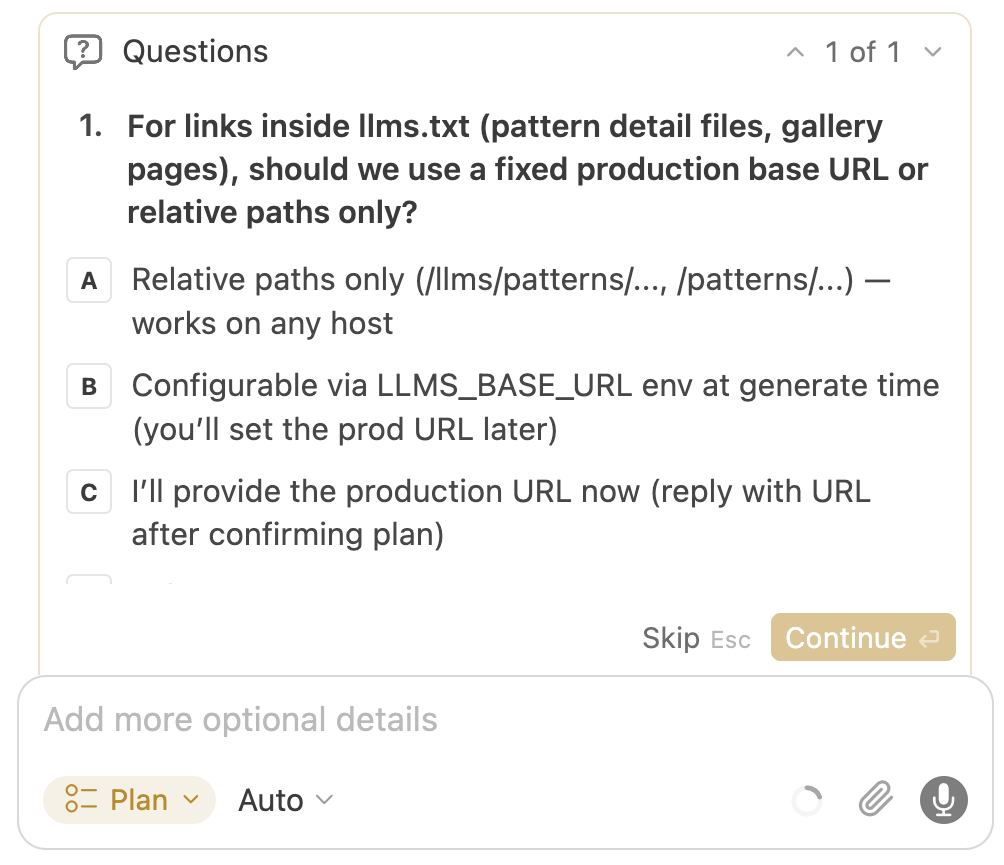
Structured questions in Plan mode
Context
Before drafting a multi-file plan, Cursor asks scoped questions with selectable options—codebase breadth, tests, risk—instead of open-ended clarification chat.
What works
- Options reduce Hick's-law fatigue vs blank chat
- Answers visibly feed the next plan step
- Continue CTA makes progression obvious
What to improve
- Question count can spike on ambiguous prompts
- Skip path and defaults must stay trustworthy
Takeaway: Constrained questions are the fastest path from vague intent to a reviewable plan in IDE agents.
v0
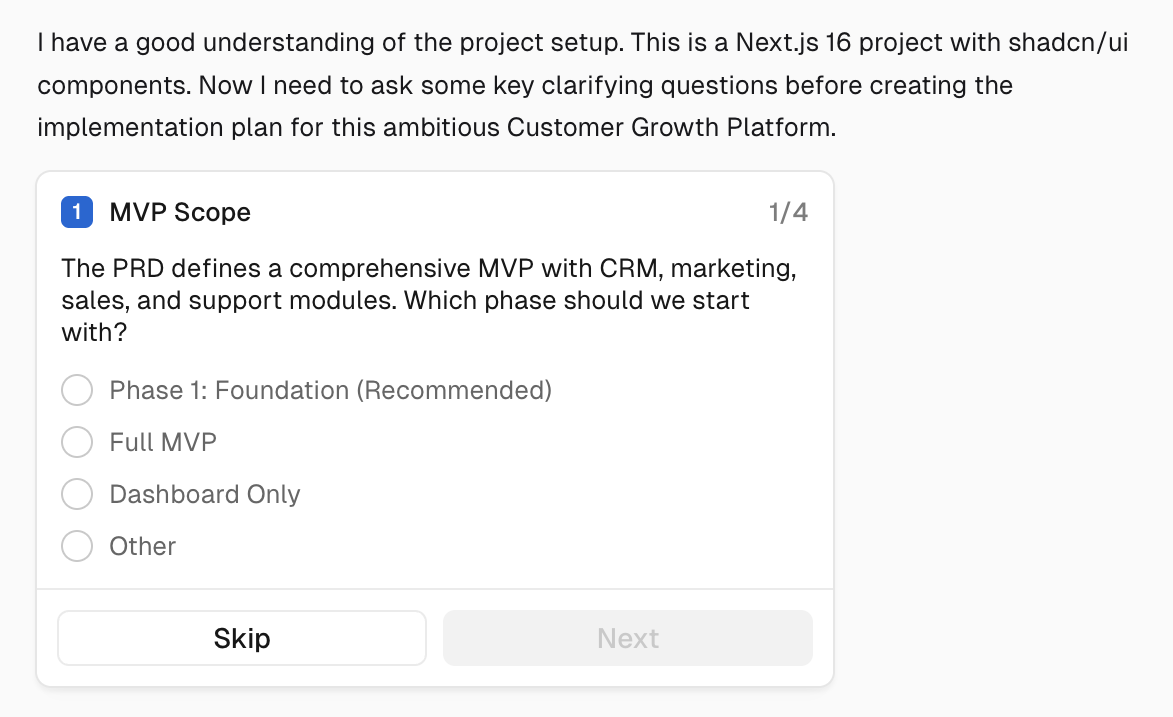
Questionnaire before build
Context
v0 uses generative UI question cards—single or multi-select—to narrow product and technical choices before producing interface code.
What works
- Generative UI makes questions feel native to the task
- Card layout keeps each decision bite-sized
What to improve
- Long questionnaires block quick iterations
- Other escape hatches must stay obvious
Takeaway: Clarifying questions and generative UI combine well when each card changes the upcoming plan materially.
Claude
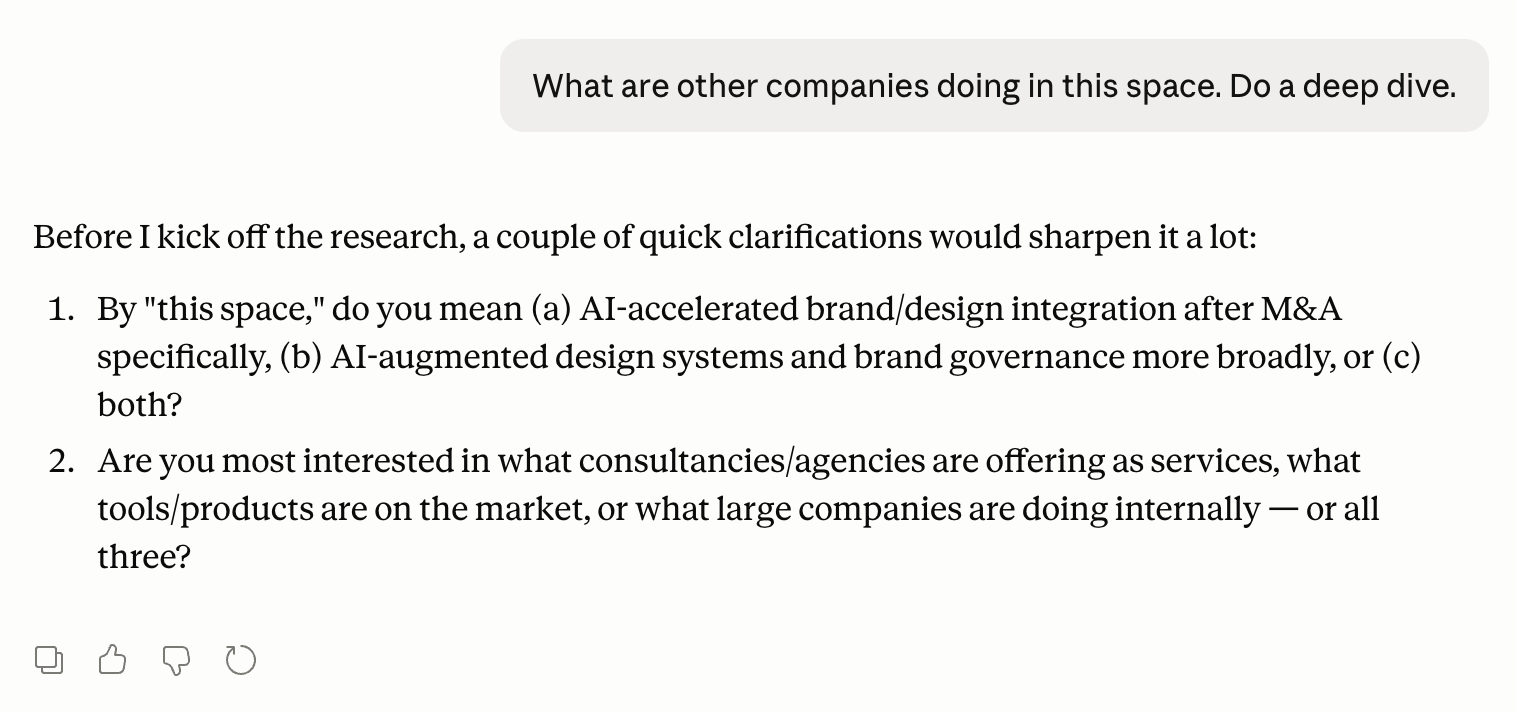
Numbered clarifiers before research
Context
Before kicking off a long research run, Claude pauses with two numbered questions—each offering explicit options (a/b/c)—so the user can narrow scope without an open-ended interview.
What works
- Options are concrete enough to answer in one reply
- Framing ('would sharpen it a lot') signals why the pause matters
- Numbered list keeps multiple dimensions scannable
What to improve
- Plain-text options lack one-click chips for faster answers
- No visible default if the user wants to skip
Takeaway: Even chat-native agents benefit from structured clarifiers before expensive runs—not only IDE plan modes.